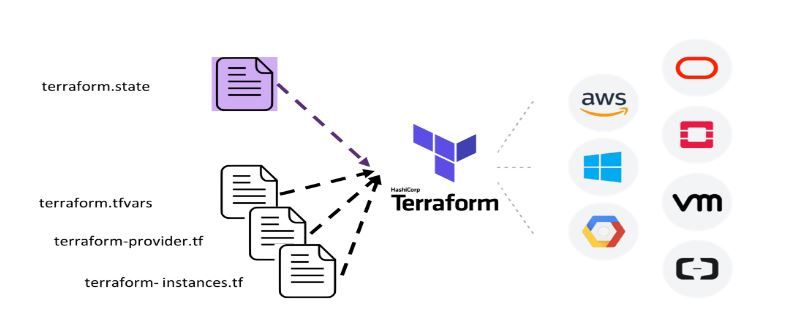
Terraform must store state about your managed infrastructure and configuration,is used by Terraform to map real-world resources to your configuration, keep track of metadata, and to improve performance for large infrastructures.
This state is stored by default in a local file named "terraform.tfstate", but it can also be stored remotely, which works better in a team environment.
primary purpose of Terraform state is to store bindings between objects in a remote system and resource instances declared in your configuration. When Terraform creates a remote object in response to a change of configuration, it will record the identity of that remote object against a particular resource instance, and then potentially update or delete that object in response to future configuration changes.
State Locking
helps to lock the state prevents multiples users to update the state file at a time.
* terraform download all plugins and store.terraform folder in the system
Terraform starts with a single workspace named "default". This workspace is special both because it is the default and also because it cannot ever be deleted. If you've never explicitly used workspaces, then you've only ever worked on the "default" workspace.
what are default things created when created vpc ?
Important points to remember:
When you create a VPC, a default route table, Network Access Control List and default security group are automatically created.
It won't create any subnets, nor it will create a default internet gateway.
2. Can we run terraform file? where is it stored?
when we configured specific remote repo in a script it will generate the .tfstate in location, specified running the code. if not specifies automatically store in the local system.
the terraform generates state lock-in RDS used to lock from multiple users at a time to the resources until the code is applied successfully.
3. terraform init?
The terraform init command is used to initialize a working directory containing Terraform configuration files. This is the first command that should be run after writing a new Terraform configuration or cloning an existing one from version control. It is safe to run this command multiple times.
4. Jenkins installation and prerequisites?
Prerequisites
Minimum hardware requirements:
256 MB of RAM
1 GB of drive space (although 10 GB is a recommended minimum if running Jenkins as a Docker container)
Recommended hardware configuration for a small team:
4 GB+ of RAM
50 GB+ of drive space
Software requirements:
Java: see the Java Requirements page
Web browser: see the Web Browser Compatibility page
install jenkins based on the system https://www.jenkins.io/doc/book/installing/ and configure it .
5. how to hide passwords in Jenkins console output?
mask password plugin to hidden the password in Jenkins console output.
6.Jenkins configuration files stores in ?
Jenkins stores the configuration for each job within an eponymous directory in jobs/. The job configuration file is config.xml, the builds are stored in builds/, and the working directory is workspace/.
7. can I clone Jenkins jobs ? or can I move from one server to another?
Move a job from one installation of Jenkins to another by simply copying the corresponding job directory.
Make a copy of an existing job by making a clone of a job directory by a different name.
Rename an existing job by renaming a directory. Note that if you change a job name you will need to change any other job that tries to call the renamed job
How do I use Git ignore?
If you want to ignore a file that you've committed in the past, you'll need to delete the file from your repository and then add a .gitignore rule for it. Using the --cached option with git rm means that the file will be deleted from your repository, but will remain in your working directory as an ignored file.
what is upstream and downsteram jobs in jenkins ?
The upstream job is the one that is triggered before the actual job is triggered. The downstream job is the one that is triggered after the actual job is triggered. We can configure the actual job not to be triggered if the upstream job is failed. In the same way, we can configure the downstream job not to be triggered if the actual job is failed.
plugins : Buildflow plugin
steps :
create jobs required for setup flow
enter in to actual project (middle project)
go to build trigger section->build after other (upstream )project build
post build select downstream project we can configure n number of projects
apply and save
in the dashboard you got the build pipeline view and name it then click ok
configure the necessary things and select upstream project
no of builds and give details
apply and save it
goto pipelines and click build
VPC endpoints
A VPC endpoint enables private connections between your VPC and supported AWS services and VPC endpoint services powered by AWS PrivateLink. AWS PrivateLink is a technology that enables you to privately access services by using private IP addresses. Traffic between your VPC and the other service does not leave the Amazon network. A VPC endpoint does not require an internet gateway, virtual private gateway, NAT device, VPN connection, or AWS Direct Connect connection. Instances in your VPC do not require public IP addresses to communicate with resources in the service.
VPC endpoints are virtual devices. They are horizontally scaled, redundant, and highly available VPC components. They allow communication between instances in your VPC and services without imposing availability risks.
The following are the different types of VPC endpoints. You create the type of VPC endpoint that's required by the supported service.
Interface endpoints
An interface endpoint is an elastic network interface with a private IP address from the IP address range of your subnet. It serves as an entry point for traffic destined to a supported AWS service or a VPC endpoint service. Interface endpoints are powered by AWS PrivateLink.
A Gateway Load Balancer endpoint is an elastic network interface with a private IP address from the IP address range of your subnet. Gateway Load Balancer endpoints are powered by AWS PrivateLink. This type of endpoint serves as an entry point to intercept traffic and route it to a service that you've configured using Gateway Load Balancers, for example, for security inspection. You specify a Gateway Load Balancer endpoint as a target for a route in a route table. Gateway Load Balancer endpoints are supported for endpoint services that are configured for Gateway Load Balancers only.
How do I access S3 bucket from Amazon EC2 without access credentials?
You can access an S3 bucket privately without authentication when you access the S3 bucket from an Amazon Virtual Private Cloud (Amazon VPC) that has an endpoint to Amazon S3.
without credentials can i log in to server?
ssh-keygen creates the public and private keys. ssh-copy-id copies the local-host’s public key to the remote-host’s authorized_keys file. ssh-copy-id also assigns proper permission to the remote-host’s home, ~/.ssh, and ~/.ssh/authorized_keys.
.45 What are the types of jobs or projects in Jenkins?
Freestyle project.
Maven project.
Pipeline.
Multibranch pipeline.
External Job.
Multi-configuration project.
Github organization.
What is a Shared Library in Jenkins?
A shared library is a collection of independent Groovy scripts which you pull into your Jenkinsfile at runtime.
The best part is, the Library can be stored, like everything else, in a Git repository. This means you can version, tag, and do all the cool stuff you’re used to with Git.
Not sure if you know Groovy? You’ve probably already it in Jenkins. It’s a Java-based scripting language, with a forgiving syntax.
Most things that you can do in Java, you can also do in Groovy. You don’t need to be a Groovy expert, but if you want to start fully learning Groovy, then you can find some learning resources here.
Here’s how you create a Jenkins library, step-by-step:
First you create your Groovy scripts (see further below for details), and add them into your Git repository.
Then, you add your Shared Library into Jenkins from the Manage Jenkins screen.
Finally, you pull the Shared Library into your pipeline using this annotation (usually at the top of your Jenkinsfile):
@Library('your-library-name')
Docker Components?
What is mean by ansible vault
Credentials where you stored in ansible
Facts in ansible
What is mean by ansible roles
Difference between docker compose and docker swarm
Difference between docker swarm and kubernetes
difference between EBS vs EFS vs S3
how to launch static website using s3 ?
How you will give access to specific user from specific bucket ?
List of companies provide remote opportunities NAME WEBSITE REGION &yet andyet.com Worldwide 10up 10up.com Worldwide 15Five 15five.com Europe, Americas 17hats 17hats.com Worldwide 18F 18f.gsa.gov USA 1Password 1password.com North America, UK 42 Technologies 42technologies.com Worldwide abiturma abiturma.de Germany Ably ably.io Europe Abstract API abstractapi.com Worldwide acct acct.global Worldwide Acivilate acivilate.com USA Acquia acquia.com Worldwide ActiveCampaign activecampaign.com Dublin, Ireland; USA Ad Hoc adhocteam.us USA Adaface adaface.com Asia AddStructure bazaarvoice.com USA Adzuna adzuna.co.uk Worldwide AE Studio ae.studio USA, BR Aerolab aerolab.co Latin America AgFlow agflow.com Europe Aha! aha.io Worldwide Aim India aimincorp.com India Airbyte airbyte.com Europe, North America, Latin America AirGarage airgarage.com USA AirTreks airtreks.com USA Aivitex aivitex.de Germany Algorand algorand.com USA Algorithmia algorithmia.com the USA or Canada ALICE aliceplatfor...
Are you curious about the magic behind those seamless web applications and services you use daily? Well, let's take a peek into the fascinating world of microservices and the tools that make them work like a charm: Istio, Kiali, Jaeger, Grafana, and Prometheus. These tools might sound a bit technical, but fear not! We're here to break it down in the simplest way possible. 1. Istio: The Traffic Director Istio is an open source service mesh that layers transparently onto existing distributed applications. Istio’s powerful features provide a uniform and more efficient way to secure, connect, and monitor services. Istio is the path to load balancing, service-to-service authentication, and monitoring – with few or no service code changes. The control plane takes your desired configuration, and its view of the services, and dynamically programs the proxy servers, updating them as the rules or the environment changes. Before utilizing Istio After utilizing Istio Imagine you're m...
T ask 1: Create a toolchain Open the creation page for the Develop a Cloud Foundry app toolchain by clicking Create toolchain: You can also select the Develop a Cloud Foundry app toolchain from the Toolchain templates list . Tip: For instructions to navigate to the toolchain templates and select a toolchain to create, see Navigating to the toolchain templates . On the creation page, review the diagram of the toolchain that you are about to create. Review the default information for the toolchain settings. The toolchain's name identifies it in IBM Cloud. Note: The URL to access your application must be unique. By default, the toolchain's name is used in constructing that URL. Make sure that the toolchain's name is unique within IBM Cloud. Each toolchain is associated with a specific region and resource group. Use the menus on the page to select the region and resource group where you want the toolchain created. You can have up to 200 toolchains per resource group. If you w...



Comments
Post a Comment