
Terraform Interwview Questions
1. What is Terraform?
Terraform is an open-source infrastructure as a code software tool created by HashiCorp It is a tool for building, changing, and versioning infrastructure safely and efficiently. Terraform can manage existing and popular service providers as well as custom in-house solutions.
2. How to Terraform work?
Terraform produce an execution plan delineate, what it will do to reach the desired state, and then executes it to build the described infrastructure. As the configuration changes, Terraform is able to determine what changed and create incremental execution plans which can be applied.
3. Explain the uses of Terraform CLI?
Terraform is controlled via a very easy to use the command-line interface (CLI) it is only a single command-line application: terraform. This application then takes a subcommand such as “apply” or “plan”. The complete list of subcommands is in the navigation to the left.
4. what are the features of Terraform?
Some features of Terraform are:-
- Graphing – Its features of graphing that are built-in are helpful in visualizing the infrastructure.
- Custom Syntax – Its custom syntax is very friendly which aids in enhancing efficiency.
- Resource Relationships – A very beneficial feature of terraforming is that it is able to understand resource relationships.
- Updates – The updates and features are added by the Open Source Project. It does so with a group of lots of contributors.
- Improved Maintenance – It is capable of breaking down the configuration into small parts or chunks for improving the organization and the maintenance.
5. What are the components of Terraform?
Terraform is another notable point for the best Terraform interview questions. The logical division of Terraform into distinct structures refers to two distinct components.
The two components are the Terraform Core and Terraform Plugins.
- The Terraform Core utilizes remote procedure calls (RPCs) for communicating with Terraform Plugins. In addition, Terraform Core also offers diverse ways of discovering and loading plugins according to requirements.
- The Terraform Plugins represent an implementation for a specific service such as bash or AWS or provisioner.
6. What are the reasons to choose Terraform for DevOps?
To choose to Terraform for DevOps one important reason people consider Terraform is to manage their infrastructure as code. Infrastructure as code is also a key and foundation for DevOps practices such as version control, code review, continuous integration, and continuous deployment.
7. Define Modules in Terraform.
Modules in terraforming is a container for multiple resources that are used together. Every Terraform configuration has at least one module, known as its root module, which consists of the resources defined in the . tf files in the main working directory.
8. what is the Terraform cloud?
Terraform Cloud is a SaaS that we support—that instead when you run Terraform you still could run it on your local machine, but now it saves and retrieves the state file from Terraform Cloud—which is running over here. Terraform Cloud removes many of the complexities in trying to maintain your own Terraform state files in a multi-team.
9. How to check the installed version of Terraform?
We can useterraform -versioncommand to identify the version which we are running.
10. Explain the Provisioners in Terraform.
Provisioners are used to model specific actions on the local machine or on a remote machine in order to prepare servers or other infrastructure objects for service.
11. What is the difference between Terraform and CloudFormation?
CloudFormation covers almost all bits and parts of AWS. Terraform covers the most important AWS resources as well. But on top of that Terraform can provision infrastructure at other cloud providers as well as 3rd party services
12. What is the null resource in Terraform?
The null_resource resource implements the standard resource lifecycle but takes no further action. The triggers argument allows specifying an arbitrary set of values that, when changed, will cause the resource to be replaced.
13. How do you use count terraform?
we just use [count. index] to dynamically specify the current iteration of the script!
14. What is a terraform provider?
Terraform is used to create, manage, and update infrastructure resources such as physical machines, VMs, network switches, containers, and more. A provider is responsible for understanding API interactions and exposing resources.
15. List Some notable applications of Terraform.
List some of the notable applications of Terraform.
- Heroku App setup
- Self-service clusters
- Development of multi-tier applications
- Creation of disposable environments
- Multi-cloud deployment
- Resource schedulers
- Developing software demos
16. Where is terraform D?
Terraform. d/plugins on most operating systems and %APPDATA%\terraform. d\plugins on Windows. By default, terraform init searches the following directories for plugins.
17. What if I encounter a serious error and want to rollback?
Recommitting the previous version of the code for making it the new and current version in a VCS (Version Control System). As a result, a terraform run triggers and runs the old code. It is essential to ensure that the old code contains all entities provisioned in the code for rollback. If the state file has been subject to corruption from a recent Terraform run, then you can opt for State Rollback Feature in Terraform Enterprise. It can help you to roll back to the previous latest state. The validation for this process is the versioning of every state change.
18. Can I use Terraform for on-premises infrastructure?
Yes, Terraform supports multi–provider deployments which include on-prem like VMware, Openstack and even using Terrarm we can manage SDN (Software Defined Network) too.
The terraform init is a command that is used to initialize a working directory containing Terraform configuration files. This is the first command that should be run after writing a new Terraform configuration or cloning an existing one from version control. It is safe to run this command multiple times.
Syntax
terraform init [options] [DIR]
Terraform state is a command that is used for advanced state management. The state is a necessary requirement for Terraform to function. Terraform must store state about your managed infrastructure and configuration. This state is used by Terraform to map real-world resources to your configuration, keep track of metadata, and to improve performance for large infrastructures. Syntax
terraform state [options] [args]
21. What is the use of terraform apply command?
The terraform apply command is used to apply the changes required to reach the desired state of the configuration, or the pre-determined set of actions generated by a terraform plan execution plan.
22. Which command is used to destroy Terraform-managed infrastructure?
The “terraform destroy command” is used to destroy the Terraform-managed infrastructure
23. What is the use of fmt command in Terraform?
fmt tool will take care of formatting. TO validate our configuration formatting and make them neat by running
terraform fmt -diff
The formatting command rewrites Terraform configuration files in a canonical format and style.
24. How to ignore duplicate resource error during terraform apply?
It is a little different situation,
Possible causes of this could be:
- Someone has executed Terraform code and we don’t have a shared/updated state
- someone has created them manually
- a Terraform destroy failed in a way that deleted the resources for the API but failed to save the update state
The solution depends on what we need as the desired state. we can try with:
- delete those resources from our Terraform code to stop managing them with it
- delete those resources from the API ( cloud provider ) and recreate them with Terraform
- Perform a terraform import of those resources and remove the terraform code that is trying to recreate them (NOT RECOMMENDED)
- use
terraform apply --target=xxxto apply only resources you need to apply (NOT RECOMMENDED)
25. Share a few Terraform CLI Commands which you use only your day to day routine?
Few common Terraform commands which I use based on need like:
- Apply: builds or changes infrastructure.
- Console: Interactive console for Terraform interpolations.
- destroy: Destroy Terraform-managed infrastructure.
- env: Workspace management
- fmt: Rewrites config files to canonical format
- get: Download and install modules for the configuration
- graph: Build a visible graph of Terraform resources Import: existing infrastructure into Terraform
- Init: Initialize a Terraform working directory
- output: Read output from a state file plan: Generate and show an execution plan validate: Validates the Terraform files
- version: Prints the Terraform version
- Workspace: Workspace management
26. In which programming language Terraform is written?
It was written using “Go programming language.”
27. Is there a way to bulk import the state of current cloud subscription into Terraform state?
We can use the terraform import command to import individual resources into our Terraform state, but there is not currently a bulk import tool.
28. Can you shortly explain the best practices for cloning an infrastructure with Terraform?
If we are referring to the promotion, then we could have dev and prod branches of a repository with Terraform code and then point dev and prod workspaces against those branches and promote changes from dev to prod to clone, but set different values of Terraform variables to account for differences between dev and prod.
If by “clone” you mean bring existing infrastructure not provisioned by Terraform under Terraform management, then we can use the terraform import command to import individual resources into our Terraform state.
or If we just want to duplicate an existing infrastructure with Terraform, then we would need to map all of our existing resources into a Terraform template.
29. Give a configuration of for creating a single E2C instance in Amazon Web Services ( AWS ).
provider “aws” { region = “ap-south-1” } resource “aws_instance” “example” { ami = “ami-4fc58420” instance_type = “t2.micro” tags { Name = “terraform-example” } }
30. What are all version controls are supported by Terraform?
- GitHub.com
- GitHub.com (OAuth)
- GitHub Enterprise
- GitLab.com
- GitLab EE and CE
- Bitbucket Cloud
- Bitbucket Server
- Azure DevOps Server
- Azure DevOps Services
Q: What is Terraform?
Ans:
Terraform is a tool for creating, updating, and versioning infrastructure securely and efficiently. Terraform is capable of managing both current and popular service providers, as well as custom in-house solutions. Configuration files notify Terraform which components are required to run a single application or an entire datacenter.
Terraform helps you Manage All of Your Infrastructure as Infrastructure as Code and promote Self-Service Infrastructure allows you to construct infrastructure as needed :
- Terraform code is written in the HCL programming language.
- Stop constructing things by hand.
- Put everything into a Terraform setup that can be repeated.
- All of the build steps are now written in code.
- It's a lot easier if you ever have to rebuild something!
Q: What are the key features of Terraform?
Ans:
Below are the key features of Terraform:
- Infrastructure as Code: A high-level configuration syntax is used to define infrastructure.
- Execution Plans: Terraform generates an execution plan during the "planning" phase.
- Resource Graph
- Change Automation
Q: What are most useful terraform commands?
Ans:
Below are the key commands of Terraform:
terraform init    # Initialize the current directory
terraform plan    # Dry run to see what Terraform will do
terraform apply   # Apply the Terraform code and build stuff
terraform destroy # Destroy what was built by Terraform
terraform refresh # Refresh the state file
terraform output  # View Terraform outputs
terraform graph   # Create a DOT-formatted graph
Q: What is Terraform Cloud
Ans:
Terraform Cloud is a hosted application that includes remote state management, API-driven runs, policy management, and other capabilities. Many users prefer a SaaS solution that is hosted in the cloud since they do not want to manage the infrastructure required to run it.
Q: What is Terraform Cloud for Business
Ans:
Terraform Cloud for Business uses the same hosted environment as Terraform Cloud, but with additional features for larger teams. Single sign-on, audit logging, and the ability to Terraform on-premise resources from the cloud are just a few of the features available.
Q: What is Terraform Enterprise
Ans:
Terraform Enterprise is the same tool, but it runs in your own data centre or cloud environment. Some users want more control over the Terraform Cloud application, or they want to execute it behind corporate firewalls in restricted networks.
Take a look at our suggested post on Java :
Q: What is module in terraform?
Ans:
A module is a container for several resources that are used in conjunction with one another. Modules can be used to construct lightweight abstractions, allowing you to define the infrastructure in terms of architecture instead of physical objects.
A Terraform module is a set of Terraform configuration files contained within a single directory. Or a basic configuration with a single directory having one or more .tf file is a module. When Terraform commands are run directly from such a directory, it is referred to as the root module.
In this way, each Terraform configuration is a module. You may have a basic collection of Terraform configuration files like:
.
|--- LICENSE
|--- README.md
|--- main.tf
|--- variables.tf
|--- output.tf
Q: What is Private Module Registry?
Ans:
Terraform Cloud provides a Private Module Registry, which allows you to store, version, and distribute modules to your organisations and teams.
Q: What is main TF in terraform?
Ans:
main.tf contains the primary configuration for your module. You can also build additional configuration files and arrange them in some helpful way for your project. Variable definitions for your module will be stored in variables.tf.
Q: How do you call a main TF module?
Ans:
When you run terraform plan or terraform apply, the.tf files in your working directory combine to form the root module. This module will call other modules and bind them by transferring output values from one to input values from another.
Q: What language does terraform use?
Ans:
Terraform configuration syntax is known as HashiCorp Configuration Language (HCL). It is designed to be both human-readable and editable, as well as machine-friendly. Terraform can also read JSON configurations for machine-friendliness.
How does terraform integrate with github and public cloud?
Ans:
The majority of businesses are migrating to the public cloud. Managing infrastructure in a secure and controlled manner is a critical step for businesses.
Check out this Terraform + GCP + Git Complete Example to learn how to use terraform to provision infrastructure on Cloud while keeping the infrastructure code in a github repository.
What is Terraform State?
Ans:
Terraform keeps track of the resources it has created in a state file. This crucial file contains all of the information Terraform requires to change, update, and delete infrastructure.
The state file is saved in your local workspace by default. We can use Terraform Cloud to store the state file as a Remote State on the cloud.
What are the disadvantages of maintaining the Terraform state file on the local machine?
Ans:
- State file sometimes contains secrets or sensitive data may be exposed
- We are unable to collaborate with the team because the file is on someone's laptop.
- On a local machine, there is a possibility of losing or deleting the state file.
- There is no centralised record keeping to track historical developments.
What exactly is Sentinel?
Ans:
Sentinel is the policy enforcement language used by HashiCorp. Sentinel policies are validated when the Terraform plan is executed. Sentinel will detect incorrect settings before they reach production, not later.
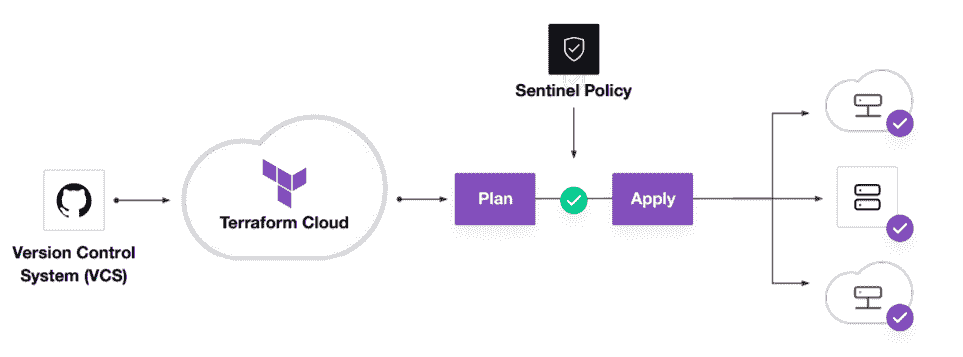 We can choose the scope of Sentinel policies that will be enforced at the Organization or Workspace level.
# Restricting region in GCP
google_region_valid = rule {
all region_values as rv {
rv == "us-west-1"
}
}What exactly do you mean when you say Policy-as-Code?
Ans:
- Treat policies as applications
- Store in version control
- Proactive vs. reactive
- Automate enforcement and review
- Automate logic testing
Can you provide few examples where we can use for Sentinel policies?
Ans:
Sentinel is a powerful tool that can be used to implement a variety of policies. Here are a few examples:- Security Standards
- Forbid or allow only certain resources, providers or data sources
- Restrict roles the cloud provider can assume
- Restrict roles the cloud provider can assume
- Audit Tracking
- Review an audit trail for Terraform Cloud operations
- Enforce explicit ownership in resources
- Resource Restriction
- Limit the size of VMs and clusters for cost
- Enforce mandatory tagging on resources built with Terraform
- Restrict modules to your organizations Private Module Registry
What are the various levels of sentinel enforcement?
Ans:
Sentinel is a powerful tool that can be used to implement a variety of policies. Here are a few examples:- Advisory :
- Logged but allowed to pass
- When a user triggers a plan that violates the policy, an advisory is issued to the user.
- Soft-Mandatory :
- Teams based permissions for overrides
- Overrides logged for audit if the policy fails
- Prevents non-compliant infrastructure from being deployed by regular users. Only administrators have the ability to overrule.
- Hard-Mandatory :
- Default enforcement level
- The policy must pass
- Only way to override is to explicitly remove the policy
- Prevents non-compliant infrastructure from being deployed by all users and apps.
Why write tests for Sentinel policies?
Ans:
- Policies and infrastructure are prone to change for refactoring.
- Writing tests assures that your policy will continue to work as intended even if things change.
- Writing testing instils trust in the policymaking process.
What are best practices in Policy Repo Management?
Ans:
Do | Don't |
| Create descriptive policy names | Push sensitive mock data to VCS |
| Test before merging | Merge without testing |
| For repository members, use the principle of least privilege. | Allow more permissions or users than your organisation need. |
How to Store Sensitive Data in Terraform?
Ans:
In order to communicate with your cloud provider's API, Terraform requires credentials. Although config files and environment variables are a preferable alternative, the credentials are still saved in plaintext on your desktop.
Every day, GitHub is exposed to thousands of API and cryptographic keys! Protecting sensitive variables such as Cloud API Keys, Passwords, SSH private keys, SSL certificates, and other sensitive text or data is critical. So these API keys should never be stored in terraform code directly.
Sensitive Variable is Secure Place for API Credentials : Terraform Cloud can securely store and encrypt your passwords. This encrypted storage can be used to store passwords, TLS certificates, SSH keys, and anything else that shouldn't be stored in plain text.


Comments
Post a Comment